- GeForce RTX 40 시리즈에 Smooth Motion 적용하기2025년 07월 18일
- 웁수
- 작성자
- 2025.07.18.:46
드라이버 패키지에서 Smooth Motion 파일만 추출, 적용하기 : https://ooopsu.tistory.com/115
NVIDIA App을 사용하지 않고 nvidia Profile Inspector (링크)와 NvPresentUpdate 조합으로 40시리즈에서 Smooth Motion 사용하는 방법.
581.08 버전부터 RTX 40시리즈에 Smooth Motion을 정식 지원하기 때문에 581.08 버전 사용자는 NvPresentUpdate 설정을 건너뛰고 nvidia Profile Inspector 설정으로 이동.

https://github.com/SimonMacer/AnWave/releases/tag/NvPresent64ForRTX40
Release NvPresentUpdate v2.0.0.32 | NvPresent64.dll Update Tool · SimonMacer/AnWave
NVIDIA's current main driver release does not support NVIDIA Smooth Motion technology. The first driver to support GeForce RTX 40 Series is GeForce R590.26 Preview Driver. Now, you can use this Ins...
github.com
위 링크에서 NvPresentUpdate-v2.0.0.32-20250722.rar 다운로드 후 압축을 풀고 NvPresentUpdate.exe 파일을 실행.

581.08 드라이버 설치시 버전 상태 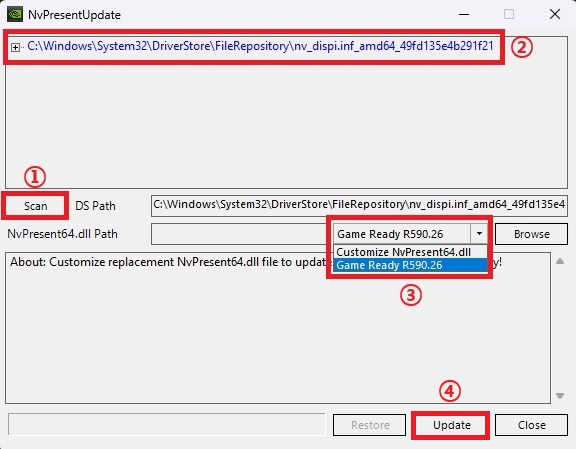
Customize NvPresent64.dll로 적용하는 방법 : https://ooopsu.tistory.com/115
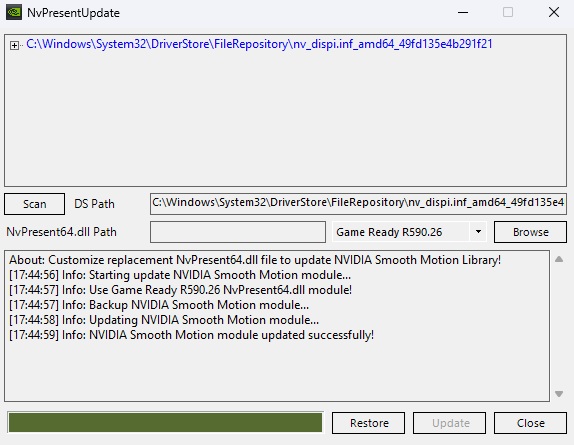
위와 같이 업데이트가 끝나고 nvidia Profile Inspector (링크)에서 세부 설정을 하면 Smooth Motion 사용 준비 완료.

Smooth Motion 설정 후 인게임에서 프레임 제한을 하고 사용하면 되고
인게임에서 프레임 제한이 없다면 엔비디아 제어판 > 3D 설정 관리에서 최대 프레임을 제한하고 사용.
(프레임 제한 참고 : https://ooopsu.tistory.com/46)
팟플레이어는 댓글 참고.
(프레임 제너레이션은 RTX 40 시리즈 이상 그래픽 카드가 있어야 하고 윈도우 설정에서 시스템 > 디스플레이 > 그래픽 > 고급 그래픽 설정에서 하드웨어 가속 GPU 일정 예약이 '켬'으로 되어 있어야 함)
Smooth Motion - Enabled APIs (NVIDIA Profile Inspector 2.4.0.29 기준)
더보기0x00000000
(Autodesk Showcase, Microsoft Office Metro Apps, Arcsoft Media Impression, Microsoft Visual Studio, MPlayer, DepthQ Player, LG HomeDrive, Omniverse-Kit, ArcSoft Total Media player, Autodesk VRED, iAVCast, Capture One, NVIDIA Stereoscopic 3D video player, Microsoft Windows Maps, EyeFidelity.LiveVideoTest, Windows Live Photo Gallery, Futuremark System Diagnosis Tool, Genshin Impact Launcher, Media Player Classic, AngleLib, Autodesk AutoCAD, Microsoft OneDrive, Pale Moon Browser, Killer Instinct, PPTV, Acer Clear.Fi, Stable Diffusion, Logitech Capture, Derivative, Angry Birds Space, Alienware Sound Center, Roxio Video Converter, Raptr, Windows Explorer, Bytedance - CapCut, webplayer_win, Intel Control Panel, Cyberlink YouCam, VSeeFace, New World, Alshow Player, Unigine: Superposition Launcher, Corel Video Studio, Autodesk Revit, AVerMedia TV player, Windows Photo Viewer, Apple iTunes, Microsoft Powerpoint, Kuaishou Streaming Client, Bilibili - Bcut, Windows Lock Screen, XBangBang, Dell Feature Enhancement Pack, Mozilla Firefox, Skype Metro App, Microsoft Excel, DiagStudio(Video Apps), Microsoft What's New, Cyberlink MediaShow Espresso, Service Host, FarmVille 2: Country Escape, EMUPLAY, VideoPlayer, NVIDIA NVFBC Applications, Cyberlink Power Director, Cyberlink PhotoDirector, Microsoft OneNote, Windows Assessment Console, Marvel vs. Capcom: Infinite, Spotify, Windows Media Center, Hunt: Showdown easy anti-cheat launcher, TeamViewer, PowerMark, Microsoft Windows People, 3D Vision plugin, BaoFeng / Storm Player, Adobe After Effects, OBS Studio, Elemental Badaboom, Dell Mobile Broadband Manager, Windows DVD Player, Google Chrome, Epic Games Launcher, CLO Virtual Fashion Inc - Clo3D, LG Smart Scan, Chaos Vantage, Jet Audio, Valve Steam WebHelper, HP DVD Play, Topaz Labs - Topaz Sharpen AI, Bai She Chuan Shuo, Opera, Channel 9, Dota 2, Microsoft SystemSettings, NVIDIA App, Windows Performance Analyzer, EVGA PrecisionX, Raptr AMD, PCMark Vantage, PopcornFX Editor, Novlum Demes Editor, DV3DPlayer, Microsoft InfoPath, VUP, Wuta Camera, Lumion, Siemens SolidEdge, Asktao, Twitter, Affinity Designer, Dell Video Stage, Adobe Soundbooth, Microsoft Windows Defender Security Center, Quick Play, Zoom, SYSmark 2012, Magix Movie Edit Pro, Microsoft Word, ProDAD - Vitascene, Microsoft Internet Explorer, League of Legends Client, XClean, DirectX Test App, QQ Player, LuxMark, Side Effects Houdini, Windows Phone 7 Emulator, Drastic Technologies - 4kScope, VCSystemTray, Reading List, Sketchpads, EpSoft jetAnywhere Print, Adobe Encore, Exposure Software - Exposure, Adobe InDesign, Vegas Movie Studio HD Platinum 11, Corel PaintShop Pro, Cast Software WYSIWYG / Vivien, CorelDRAW, Corel VideoStudio, Microsoft Access, Pixologic Zbrush, TCHD Video - Live, Pieces, Nero Move It, Adobe Substance, Media Foundation, Microsoft SharePoint Workspace, Adobe Photoshop, Digiarty Software VideoProc, Xunlei Player, Adobe Character Animator, GameDVR, Toshiba Gesture Controller, Next Limit - Maxwell Studio, Microsoft SharePoint Designer, Pixar RenderMan, Roblox VR, Corel Photo-Paint, ArcSoft Total Media Theatre 6, EA Sports WRC, Twinmotion, NewBlueFX - Titler Pro, video_usage_codec_dxva_modewmv9_c, Windows System Process, Microsoft Windows Alarms, Autodesk Arnold, Microsoft Windows Mail and Calendar, CyberLink ColorDirector, Microsoft Edge, Square Box - CatDV, Live2D Viewer, Mighty Bake, Dell Resource DVD, SearchUI, Microsoft Project, Shunwang GameLife, Bentley Systems MicroStation, Xsplit Gamecaster, Dungeon and Fighter, NVStream Service, Windiag, FXhome Imerge Pro, Adobe Media Encoder CC, Yahoo Messenger, Dragon Throne + Expansion, Windows Messenger, Adobe Bridge CC, CUDAMiner, Red Giant - Pluraleyes, Toon Boom - Storyboard Pro, video_usage_codec_dxva_modeh264_c, Mozilla FireFox - Plugin Container, video_usage_codec_dxva_modeh264_e, Waidayo, video_usage_codec_dxva_modeh264_a, NVIDIA System Monitor, GOM Player, NVStWiz, Blaze DVD, Interactive Data Visualization ...
0x00000003 (Counter-strike 2, No Man's Sky)
0x00000004 (Battlefield V, Battlefield 6, Battlefield 1, Battlefield 2042, Valorant, The Finals, Watch Dogs: Legion, Control, Horizon Forbidden West Complete Edition, F1 25)
0x00000005 (Fortnite, Shadow of the Tomb Raider, The Long Dark)
0x00000006 (Bright Memory: Infinite, Ghost of Tsushima: Directors Cut, Monster Hunter Wilds, Grand Theft Auto V Enhanced, Marvels Spider-Man 2, Marvel's Spider-Man Remastered, Final Fantasy XVI, Far Cry 6, Marvel's Spider-Man: Miles Morales, God of War Ragnarok, Starminer, FBC: Firebreak)
0x00000007 (VkPlanets, VkCube)Realtek Gaming GbE 컨트롤러 게이밍 최적화 정리 : https://ooopsu.tistory.com/93
'게임' 카테고리의 다른 글
클레르 옵스퀴르: 33 원정대 그래픽 설정 (2) 2025.07.26 둠: 더 다크 에이지스 (Doom: The Dark Ages) 그래픽 설정 (10) 2025.07.26 최적의 FPS 제한과 G-Sync에 대한 잘못된 상식을 바로잡기 (27) 2025.07.03 유로트럭2 스크린샷 (0) 2025.06.28 인디아나 존스: 그레이트 서클 그래픽 설정 (0) 2025.06.22 다음글이전글이전 글이 없습니다.댓글